
 AI
AIMost people think they have a prompt problem.
They actually have a context problem.
Claude is smart enough to help with almost anything. But most of the time, the information it needs isn’t in the chat. It’s sitting in your emails, your calendar, your documents, your tickets, your databases, your internal tools.
So the workflow ends up looking like this:
Search for information → Copy it → Paste it into Claude → Wait for a response → Copy the response → Move it somewhere else
It works, but it doesn’t scale.
That’s where Claude connectors come in.
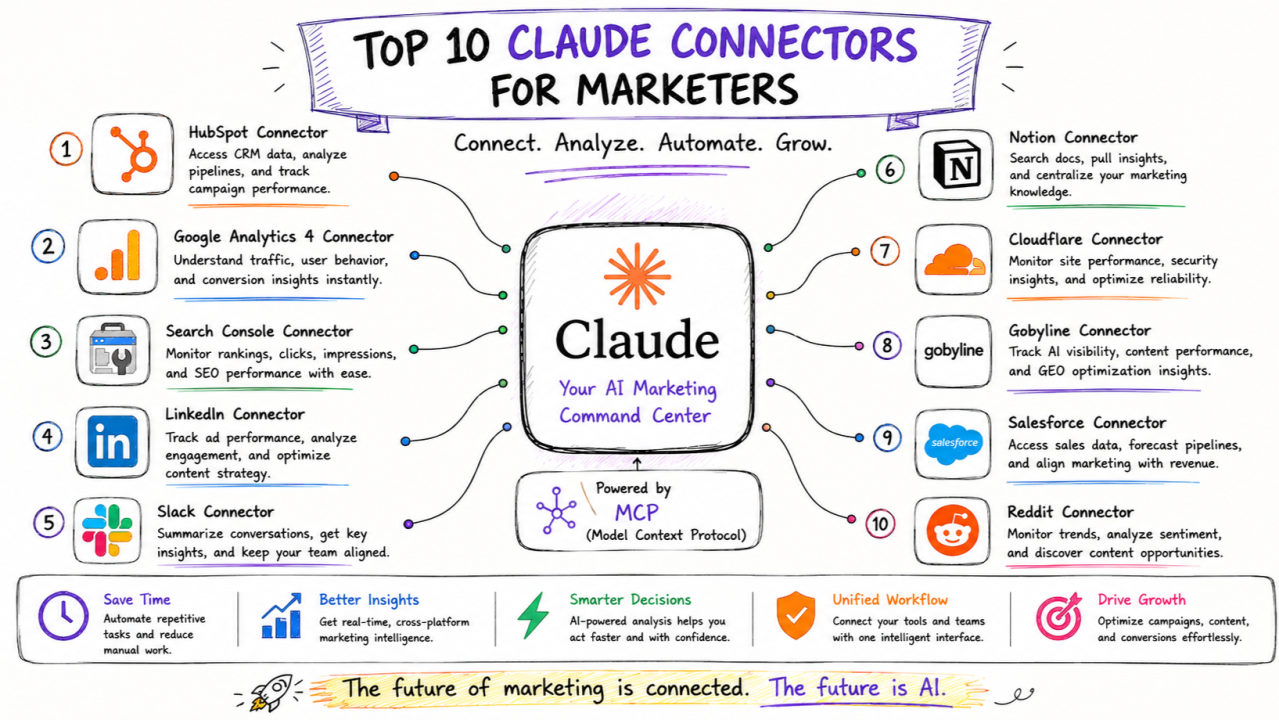
Connectors let Claude talk to apps like Gmail, Notion, Google Drive, and others, so it can pull info from them or take actions on your behalf, instead of you copy-pasting things into the chat.
Artificial intelligence is no longer a standalone tool — it's most powerful when it's connected to the systems your business already uses. Anthropic's Claude AI has built a thriving connector ecosystem through its Model Context Protocol (MCP), enabling deep integrations with dozens of platforms. Whether you're a developer, business owner, or operations lead, the right Claude connectors can save hours every week.
Here are the 10 best Claude connectors in 2025 and exactly why you need them.
1. Google Drive — Your Documents, Made Searchable by AI
The Google Drive connector lets Claude read, summarize, and analyze files stored in your Drive — PDFs, Docs, Sheets, and more. Instead of manually searching through hundreds of documents, you can ask Claude to pull the right information instantly. For teams managing proposals, reports, or knowledge bases, this is a game-changer.
Why you need it: Stop wasting time hunting for files. Claude finds the answer inside your documents in seconds.
2. GitHub — AI-Powered Code Review and Documentation
The GitHub connector gives Claude access to your repositories, pull requests, and issues. It can review code, suggest fixes, write commit messages, generate documentation, and even explain legacy code your team didn't write. Development teams using this connector report significantly faster PR review cycles.
Why you need it: Faster code reviews, fewer bugs in production, and auto-generated docs that actually stay up to date.
3. Notion — Turn Your Knowledge Base Into a Live Assistant
Connect Claude to your Notion workspace and it gains access to your entire company knowledge base — SOPs, meeting notes, project plans, wikis. Employees can ask natural language questions and get answers sourced directly from your internal documentation rather than guessing or asking a colleague.
Why you need it: Onboarding new employees becomes dramatically faster when they can query your Notion docs directly through Claude.
4. Slack — Bring Claude Into Every Team Conversation
The Slack connector embeds Claude into your team's communication hub. It can summarize long threads, draft replies, answer questions using connected data sources, and even trigger automations — all without leaving Slack. This is the connector that makes Claude feel like a true team member rather than a separate tab.
Why you need it: Your team already lives in Slack. Meet them there with AI that understands context.
5. Confluence — Enterprise Documentation at AI Speed
For teams using Atlassian's Confluence, this connector allows Claude to read and reason over your entire wiki. Technical writers, product managers, and support teams can query complex internal documentation and get precise, cited answers. Claude can also help update outdated pages by comparing them against newer sources.
Why you need it: Enterprise wikis are often too large for anyone to fully read. Claude reads all of it so you don't have to.
6. Jira — Smarter Project Management With AI Context
The Jira connector lets Claude understand your project board, open tickets, sprint backlogs, and issue history. It can write ticket descriptions, estimate complexity, suggest priorities, and generate sprint summaries — making project managers significantly more productive. Claude can also link related issues automatically.
Why you need it: Better tickets mean better software. Claude turns a one-line task description into a well-structured Jira issue in seconds.
7. Zapier — No-Code Automation Between Claude and 6,000+ Apps
Zapier's Claude integration is one of the most powerful no-code automation tools available. You can build Zaps that trigger Claude to summarize emails, classify leads, generate content, respond to form submissions, or process data — then push those results to any of Zapier's 6,000+ connected apps. No developer required.
Why you need it: If your business runs on tools like Gmail, HubSpot, Airtable, or Shopify, Zapier turns Claude into the brain of your automation stack.
8. Linear — AI-Assisted Engineering Team Workflows
Linear is the project management tool of choice for modern engineering teams, and its Claude connector takes it further. Claude can triage incoming bug reports, write structured issue descriptions from rough notes, summarize completed cycles, and help teams prioritize work based on impact. Fast-moving startups especially benefit from this integration.
Why you need it: Engineering velocity increases when AI handles the administrative overhead of issue tracking.
9. Dropbox & Box — Secure File Intelligence for Enterprise
For businesses storing contracts, compliance documents, or client files in Dropbox or Box, the Claude connector enables secure AI-powered document analysis. Legal teams can ask Claude to compare contracts, compliance officers can scan for regulatory issues, and sales teams can extract key terms from client agreements — all within their existing secure storage environment.
Why you need it: Sensitive documents need AI analysis too, and these connectors keep everything within your existing security perimeter.
10. Custom MCP Connectors — Build Claude Into Your Own Systems
The most powerful connector of all is a custom one built specifically for your business. Anthropic's open Model Context Protocol (MCP) allows developers to connect Claude to any internal database, API, CRM, ERP, or proprietary system. This is where AI moves from a generic tool to a deeply embedded business intelligence layer that understands your specific data, terminology, and workflows.
Why you need it: Off-the-shelf connectors cover common tools, but your competitive advantage comes from connecting Claude to the systems that are unique to your business.
At OrbitalLogics, we specialize in building custom MCP connectors and AI integrations tailored to your business operations. Whether you need Claude connected to a legacy ERP, a custom CRM, or an internal data warehouse, our team designs and deploys production-ready AI integrations that deliver measurable ROI.
Frequently Asked Questions
What is a Claude connector?
A Claude connector is an integration that links Claude AI to an external tool, platform, or data source using Anthropic's Model Context Protocol (MCP) or a third-party automation layer like Zapier. Connectors allow Claude to read, analyze, and act on real data from your existing systems rather than relying only on information you manually paste into the chat.
Are Claude connectors secure for business use?
Yes. Official Claude connectors provided through Claude.ai operate within Anthropic's enterprise security framework, including SOC 2 compliance. For custom MCP connectors, security depends on how they are implemented — reputable development teams build them with role-based access controls, encrypted connections, and audit logging to meet enterprise security standards.
Do I need a developer to set up Claude connectors?
It depends on the connector. Pre-built connectors for tools like Google Drive, Notion, and GitHub can be enabled directly inside Claude.ai with no coding required. However, custom MCP connectors that integrate Claude with proprietary or internal systems do require a developer. If you need a custom integration, OrbitalLogics can handle the full build and deployment.
OrbitalLogics — App Development
Want to integrate AI & automation into your business?
Our team builds reliable, scalable solutions tailored to your business goals.
Author
OrbitalLogics Team
Expert writer at OrbitalLogics covering the latest in web development, app development, and tech industry trends.
Want to integrate AI & automation into your business?
Our team at OrbitalLogics specializes in app development — turning ideas into real, scalable solutions. Let's discuss your project, no commitment required.
Leave a Comment
Your email address will not be published.